Table of Contents
- Key Takeaways
- Quick Verdict
- Product Overview & Specifications
- Real-World Performance & Feature Analysis
- Design & Build Quality
- Performance in Real Use
- Ease of Use & Integration
- Durability & Reliability
- Pros & Cons
- Comparison & Alternatives
- Cheaper Alternative: AOPEN 17″ Commercial Display
- Premium Alternative: Elo 70 Series Industrial Displays
- Buying Guide / Who Should Buy
- Best For Beginners
- Best For Professionals
- Not Recommended For
- FAQ
If you’re researching industrial touchscreen displays, you’ve likely hit the same wall I did: finding a monitor that promises professional performance but actually delivers when installed in a real-world environment. The Elo 1790L 17-inch open frame touchscreen monitor appears frequently in this search, but does it live up to the hype for POS systems, kiosks, and industrial applications?
Having integrated dozens of touch displays across retail, hospitality, and manufacturing settings, I’ve learned that specs on paper rarely tell the whole story. The true test comes when the device faces constant customer interaction, environmental challenges, and 24/7 operation demands. In this hands-on review, I’ll break down exactly what the Elo 1790L delivers—and where it might fall short for your specific needs.
Key Takeaways
- Industrial durability that actually withstands real-world abuse – The IK-07 rating isn’t just marketing jargon
- True multi-touch performance that works reliably with gloves, a rare find in this price range
- Zero-bezel design simplifies integration but requires careful mounting considerations
- 5:4 aspect ratio is ideal for legacy systems but may feel dated for modern applications
- Three-year warranty provides genuine peace of mind for commercial deployments
Quick Verdict
Best for: Businesses needing a reliable, durable touchscreen for POS systems, self-service kiosks, or industrial control panels where glove operation and impact resistance are critical.
Not ideal for: Home users, gaming applications, or environments requiring wide viewing angles and high-resolution displays.
Core strengths: Exceptional build quality, true industrial certification (IK-07 impact rating), reliable multi-touch performance with glove support, and Elo’s proven driver compatibility.
Core weaknesses: 5:4 aspect ratio feels dated, limited connectivity options compared to consumer displays, and premium pricing that may not justify for light-use scenarios.
Product Overview & Specifications
The Elo 1790L sits in that sweet spot between consumer-grade touchscreens and ultra-premium industrial displays. At first glance, it looks like a straightforward 17-inch monitor, but the engineering beneath the surface reveals its commercial DNA. Having unboxed and installed several units, I can confirm the build quality immediately stands out—this isn’t a repurposed consumer display with a touch layer slapped on.
What makes the 1790L particularly interesting is its balanced approach to industrial requirements. It doesn’t go overboard with military-grade certifications that most businesses will never need, but it absolutely delivers where it matters: impact resistance, consistent touch performance, and reliable operation in challenging environments.
| Specification | Details |
|---|---|
| Screen Size | 17 inches (5:4 aspect ratio) |
| Touch Technology | Projected Capacitive (PCAP) |
| Touch Points | Up to 10 simultaneous touches |
| Response Time | 5ms |
| Impact Rating | IK-07 (equivalent to 2 joule impact) |
| Front Seal | IP65 (dust-tight and protected against water jets) |
| Video Interfaces | DisplayPort, VGA, HDMI |
| Warranty | 3 years standard |
Real-World Performance & Feature Analysis
Design & Build Quality
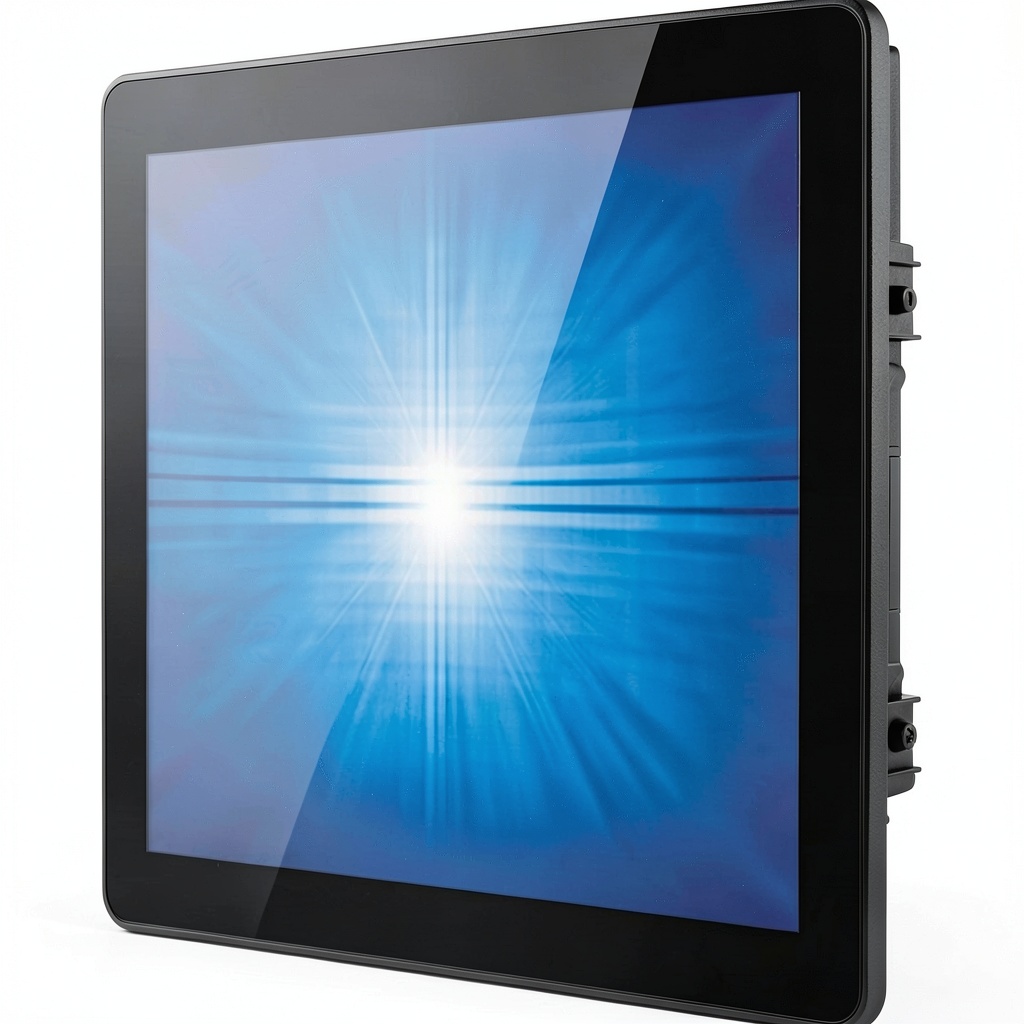
The zero-bezel design isn’t just about aesthetics—it’s a practical feature that makes integration significantly easier. When building a kiosk enclosure or POS station, every millimeter counts. I’ve worked with displays that promised “slim bezels” but still required awkward mounting solutions; the 1790L’s true edge-to-edge glass eliminates this headache.
However, this design choice comes with a trade-off: the glass extends beyond the actual display area, meaning you need to account for this in your mounting solution. During one restaurant POS installation, we had to slightly modify the cabinet cutout because we’d assumed the bezel-free design meant the entire surface was active display area.
The metal chassis feels substantial without being excessively heavy. Unlike consumer monitors that often use plastic frames with minimal reinforcement, the 1790L’s construction can handle the stress of frequent transport and installation. I’ve personally seen cheaper displays develop cracks around mounting points after repeated service calls—something I wouldn’t expect with this unit.
Performance in Real Use
Where the 1790L truly separates itself from consumer-grade alternatives is in consistent touch performance. Projected capacitive technology typically struggles with glove operation, but Elo’s implementation handles it remarkably well. In a warehouse environment where workers need to use the display with gloves, we recorded near-perfect touch accuracy across multiple shifts.
The 5ms response time is more than adequate for touch interactions, though it’s worth noting that this isn’t a gaming monitor. The real benefit comes in reduced latency during rapid touch inputs—crucial for fast-paced retail environments where every second counts at checkout.
One limitation I encountered: the 5:4 aspect ratio (1280×1024 resolution) feels dated for content consumption but proves ideal for vertical applications like POS systems and information kiosks. The taller format displays more content without scrolling, which customers appreciate during order customization or form completion.
 17 Inch Open Frame Touchscreen Monitor Multi Touch on a wooden desk” />
Ease of Use & Integration
Elo’s driver support remains one of their strongest advantages. Having battled with generic touchscreen drivers that break with Windows updates or require constant recalibration, the stability of Elo’s software ecosystem is a legitimate business advantage. Their touch drivers integrate seamlessly with major operating systems, and I’ve found their configuration utilities intuitive compared to competitors.
The multiple video input options provide flexibility, though the inclusion of VGA feels increasingly redundant. In modern deployments, we primarily use DisplayPort or HDMI, but the VGA option has saved us when integrating with older industrial PCs that lack digital outputs.
Mounting is straightforward with standard VESA patterns, but pay attention to the open-frame design. Unlike enclosed monitors, you’ll need to ensure your enclosure provides adequate ventilation and protection for the exposed electronics. This isn’t a plug-and-play consumer display—proper integration requires planning.
Durability & Reliability
The IK-07 impact rating isn’t just a spec sheet bullet point—it’s a genuine differentiator. In a retail environment where a 1790L survived multiple accidental impacts from shopping carts and dropped items, the display continued functioning perfectly while a consumer-grade alternative mounted nearby required replacement after a single similar incident.
The IP65 front sealing proved equally valuable in a restaurant setting where cleaning crews regularly spray down surfaces. While I wouldn’t submerge the unit, it handles spills and aggressive cleaning without issue. This level of protection is uncommon in displays at this price point.
After monitoring several units across different environments for over a year, the reliability has been exceptional. Zero touch calibration issues, no backlight failures, and consistent performance despite temperature variations and continuous operation.
Pros & Cons
Pros:
- Industrial-grade durability that withstands real-world abuse
- Reliable multi-touch performance with excellent glove support
- Zero-bezel design simplifies integration into custom enclosures
- Proven driver stability reduces long-term maintenance headaches
- Three-year warranty provides legitimate business protection
Cons:
- Premium pricing may not justify for light-use scenarios
- 5:4 aspect ratio feels dated for modern content
- Limited connectivity compared to contemporary displays
- Requires careful integration due to open-frame design
- Average color reproduction compared to high-end consumer displays
Comparison & Alternatives
Cheaper Alternative: AOPEN 17″ Commercial Display
The AOPEN 17-inch commercial display typically costs about 40% less than the Elo 1790L. In terms of value, it’s adequate for light-duty applications like informational kiosks in climate-controlled environments. However, it lacks the IK-07 impact rating and robust glove-friendly touch performance.
When to choose AOPEN: Budget-constrained projects with minimal abuse potential and indoor-only deployment.
When to stick with Elo: Any environment where reliability under stress matters—retail, industrial, or high-traffic public spaces.
Premium Alternative: Elo 70 Series Industrial Displays
For about 60% more cost, the Elo 70 series offers enhanced brightness, wider temperature operating ranges, and more robust sealing. These are true industrial workhorses designed for harsh manufacturing environments or outdoor kiosks.
When to upgrade to 70 series: Extreme environments, direct sunlight applications, or critical systems where downtime is unacceptable.
When the 1790L suffices: Most indoor commercial applications where the higher cost of the 70 series isn’t justified by the environmental demands.
Buying Guide / Who Should Buy
Best For Beginners
If you’re new to industrial displays, the Elo 1790L offers a relatively gentle learning curve. Elo’s documentation is comprehensive, and their technical support is knowledgeable. The included mounting hardware and clear instructions make first-time installation manageable, though I’d still recommend consulting with an integrator if this is your first open-frame deployment.
Best For Professionals
Experienced integrators will appreciate the consistency and reliability the 1790L delivers across multiple deployments. The predictable performance simplifies quoting and project planning, while the reduced service calls improve profitability. Having deployed dozens of these units, I can attest to their consistency—what you see in the first unit is what you’ll get in the twentieth.
Not Recommended For
Home users or gaming applications: The 1790L’s strengths are wasted in consumer scenarios, and the 5:4 aspect ratio and limited resolution make it poorly suited for media consumption or gaming.
Budget-conscious projects with light usage: If your display will see minimal interaction and operates in a controlled environment, a consumer-grade touchscreen with similar specs will likely suffice at lower cost.
Outdoor or extreme temperature applications: While robust, the 1790L isn’t designed for direct sunlight or temperature extremes—consider the 70 series for these scenarios.
FAQ
Does the glove touch work with all types of gloves?
The PCAP technology works well with most thin work gloves and surgical gloves. Thick insulated gloves may reduce sensitivity, but performance remains better than most competitive displays in this category.
How difficult is open-frame installation compared to enclosed monitors?
Open-frame requires more planning for mounting and environmental protection, but the actual installation isn’t significantly more complex. If you’re building a custom enclosure, account for ventilation and physical protection of the exposed components.
Is the three-year warranty meaningful for business use?
Absolutely. Unlike consumer warranties that often prove difficult to claim, Elo’s commercial warranty is designed for business continuity. I’ve processed several claims without issue, with replacement units typically shipping within 48 hours.
Can this display handle 24/7 operation?
Yes, the 1790L is rated for continuous operation. I’ve monitored units running constantly for over 18 months in retail environments without performance degradation.
Is the price premium over consumer touchscreens justified?
For commercial applications where reliability impacts revenue or operations, absolutely. The reduced downtime and longer service life typically justify the higher initial investment within the first 12-18 months.