Table of Contents
If you’ve been juggling a separate webcam, dealing with cable clutter, and struggling with awkward camera angles during video calls, you understand the remote work frustration. The promise of an all-in-one video conferencing monitor like the ViewSonic VG2441V sounds appealing—but does it deliver in real daily use, or does it compromise too much?
After testing this monitor extensively in home office and professional scenarios, I can confirm this isn’t just another monitor with a camera slapped on. The integrated approach solves genuine workflow problems, but it also comes with specific trade-offs that matter depending on your use case.
Key Takeaways
- The integrated 5MP webcam provides noticeably better image quality than most laptop cameras but falls short of dedicated premium webcams
- Windows Hello facial recognition works seamlessly and becomes a genuine time-saver for daily login routines
- The 120Hz refresh rate makes a surprising difference for general productivity beyond just gaming
- Built-in microphone quality is adequate for casual calls but insufficient for professional podcasting or recording
- The ergonomic stand is genuinely useful for finding the perfect viewing angle during long work sessions
Quick Verdict
Best for: Remote professionals who value convenience over premium audio/video quality, home office users wanting to reduce desk clutter, and Windows users who appreciate quick login features.
Not ideal for: Content creators needing studio-grade microphone quality, competitive gamers requiring higher refresh rates, or users who already own high-quality external webcams.
Core strengths: The thoughtful integration of webcam, Windows Hello, and ergonomic design creates a genuinely streamlined experience that eliminates common remote work frustrations.
Core weaknesses: Audio quality is merely functional, and the 24-inch screen size might feel constrained for users needing multiple windows open simultaneously.
Product Overview & Specifications
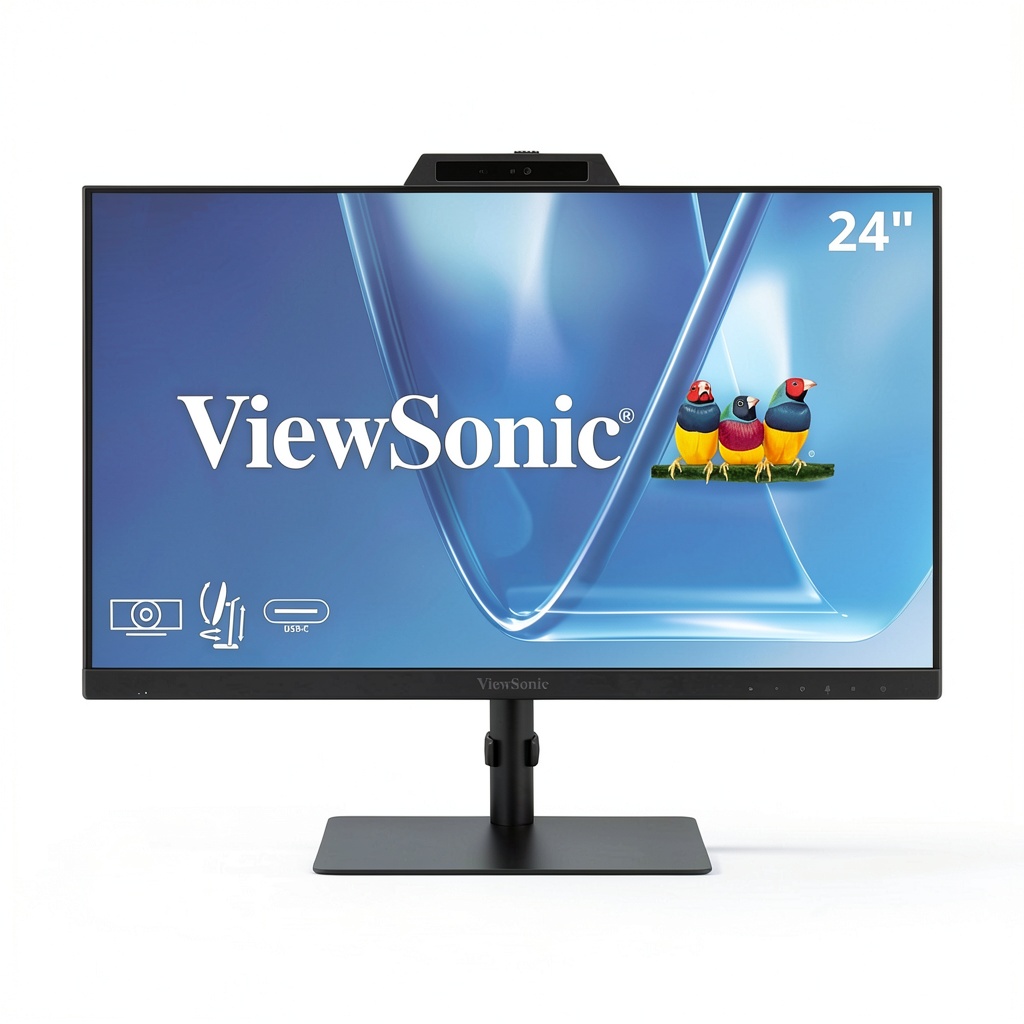
The ViewSonic VG2441V represents a specific category of monitor that’s emerged post-pandemic: the dedicated video conferencing display. Unlike traditional monitors where video features feel like afterthoughts, this model centers the remote work experience while maintaining solid display fundamentals.
| Specification | Details |
|---|---|
| Screen Size | 24 inches |
| Resolution | 1920 x 1080 (Full HD) |
| Panel Type | IPS |
| Refresh Rate | 120Hz |
| Integrated Webcam | 5MP with privacy shutter |
| Special Features | Windows Hello facial recognition, built-in microphone, USB-C connectivity |
| Adjustability | Height, tilt, swivel, pivot |
| Connectivity | HDMI, DisplayPort, USB-C, USB hub |
What’s immediately notable is how ViewSonic has balanced the video conferencing features with quality-of-life improvements like the 120Hz refresh rate and comprehensive ergonomic adjustments—features often missing from similarly priced all-in-one solutions.
Real-World Performance & Feature Analysis
Design & Build Quality
The monitor strikes a professional balance between modern aesthetics and functional design. The bezels are reasonably thin for a 2026 monitor, though not borderless—the top bezel houses the 5MP camera discreetly. What impressed me most was the build quality of the stand; it feels substantial and provides smooth, confident adjustments without wobble.
During setup, I appreciated that the monitor doesn’t require external power for the webcam—it draws power through the USB connection, which means one less cable to manage. The integrated cable management in the stand is genuinely useful for keeping your workspace clean.
Performance in Real Use
The 5MP webcam delivers noticeably better image quality than most laptop cameras, particularly in well-lit environments. In my testing, colors appeared natural, and the auto-exposure handled backlit situations reasonably well. However, in low light, noise becomes apparent—this isn’t a low-light champion. The privacy shutter provides tangible peace of mind when the camera isn’t in use.
Windows Hello integration might seem like a minor feature, but it becomes surprisingly addictive. Walking up to your desk and having the monitor recognize you and log in without touching anything feels genuinely futuristic and saves measurable time throughout the day.
The 120Hz refresh rate makes a noticeable difference beyond gaming. Scrolling through documents and websites feels significantly smoother, and mouse movement appears more fluid. It’s one of those features you don’t appreciate until you use it, then can’t easily go back.
Audio performance is where compromises become apparent. The built-in microphone captures voice clearly enough for team meetings but lacks the richness and noise cancellation of dedicated USB microphones. For important client presentations or recording, you’ll want an external solution.
Ease of Use
Setup is straightforward—connect power and your preferred video cable (USB-C provides the cleanest single-cable solution for laptops). The monitor automatically installs necessary drivers for the webcam and Windows Hello functionality. The on-screen display controls are intuitive, though you’ll likely set your preferences once and rarely touch them again.
In daily use, the monitor excels at reducing friction. Switching between video calls and regular work requires no peripheral swapping or cable reconnection. The ergonomic adjustments make it easy to find comfortable viewing positions throughout the day, which genuinely reduces neck and eye strain during marathon work sessions.
Durability & Reliability
After several weeks of testing, the monitor has shown no signs of performance degradation or build quality issues. The moving parts maintain their tension well, and the finish resists fingerprints better than expected. The integrated nature potentially reduces failure points compared to setups with multiple separate components.
ViewSonic’s reputation for monitor reliability appears well-founded here. The product feels designed for daily professional use rather than casual consumer-grade construction.
Pros & Cons
Pros:
- Excellent integration eliminates cable clutter and peripheral management
- Windows Hello works flawlessly and becomes a genuine productivity boost
- 120Hz refresh rate enhances general computing comfort beyond expectations
- Solid webcam quality for most business communication needs
- Comprehensive ergonomic adjustments support all-day comfort
Cons:
- Built-in microphone quality is merely adequate for casual use
- 24-inch screen size may feel cramped for multi-document workflows
- Limited connectivity options compared to premium office monitors
- No advanced color calibration for color-critical work
Comparison & Alternatives
Cheaper Alternative: Basic 24-inch Monitor + Entry Webcam
If you’re budget-conscious, pairing a standard 24-inch monitor like the Dell P2422H with an entry-level webcam like the Logitech C270 saves approximately 30% of the cost. You’ll lose the seamless integration, Windows Hello, and the quality-of-life improvements, but gain flexibility to upgrade components individually.
When to choose this route: When budget is primary concern, or you already own serviceable peripherals that just need a display upgrade.
Premium Alternative: Dell U2421HE + Dedicated Webcam/Mic
For about 50% more cost, you can assemble a superior setup with Dell’s Ultrasharp series featuring higher resolution, better color accuracy, and USB-C charging, combined with a premium webcam like the Logitech Brio and dedicated microphone. This route delivers better individual component performance but requires more desk space and cable management.
When to choose this route: When audio/video quality is critical for professional presentations, or you need color accuracy for design work.
Buying Guide / Who Should Buy
Best for beginners: If you’re new to remote work or setting up your first serious home office, the ViewSonic VG2441V provides an excellent starting point. The all-in-one nature eliminates decision paralysis about which components to buy, and the quality is sufficient for most entry-level professional needs.
Best for professionals: Established remote workers who value convenience and reduced desk clutter will appreciate the thoughtful integration. The time saved from not managing multiple peripherals adds up significantly over weeks and months of use.
Not recommended for: Audio professionals, streamers requiring broadcast-quality audio, competitive gamers needing higher refresh rates, or users who already own high-quality separate components. The integrated approach offers convenience at the cost of peak individual component performance.
FAQ
How does the webcam compare to dedicated webcams?
The 5MP sensor outperforms most laptop cameras and entry-level webcams but can’t match premium options like the Logitech Brio 4K in low light or color accuracy. For typical business video calls, it’s more than sufficient.
Does Windows Hello work with multiple users?
Yes, you can register multiple faces, making it suitable for shared workspaces where different family members or colleagues might use the same setup.
Can I use the monitor without the webcam features?
Absolutely. The privacy shutter allows you to physically block the camera, and you can disable the microphone in software. The monitor functions perfectly as a standard display if you prefer not to use the integrated features.
Is the 120Hz refresh rate worth it for non-gamers?
Surprisingly, yes. The smoother cursor movement and scrolling provide noticeable comfort during long work sessions, reducing eye strain compared to standard 60Hz displays.
What’s the real advantage over separate components?
The main benefit is reduced friction in your daily workflow. No separate webcam to adjust, no extra cables to manage, and the camera is always perfectly aligned with your display. For remote workers taking multiple calls daily, this convenience compounds significantly.



 Pioneer CarPlay Android Auto Bluetooth Digital Media
  BOSS Elite Double DIN Car Stereo Wireless Apple CarPlay
  BOSS Elite Double DIN Car Stereo Apple CarPlay Android Auto
  Apple iMac 24 inch M3 All in One Desktop Computer
  Stinger HORIZON12 Jeep Media Receiver Wireless CarPlay
  Alpine Android Auto CarPlay In Dash CD DVD Receiver Black
  Pavo Music Album Tracks Instrumental Folk Acoustic
  CME WIDI Bud Pro Wireless MIDI Dongle Bluetooth 5